
The developer opening follows a separate rollout one day earlier. On November 18, Google began making the new Project Genie experience available to eligible Google AI Ultra subscribers, while AI Pro members could join a waitlist. On November 19, it announced that Genie 4 could also be used by developers through the Gemini API and Google AI Studio. That sequence moves the model from a subscription-only interactive experience into an API workflow with a session lifecycle, transports, authentication and usage billing. It does not turn the model into a general-purpose game engine or a persistent physical simulator. Google’s developer availability announcement · Google’s Project Genie rollout
The practical offer is specific. A developer can seed a world with text, a reference image or both, then send live keyboard actions and text changes while receiving generated video with synchronized audio. The stream runs at 720p and 24 frames per second. Google says this makes prototyping interactive experiences, spatial concepts and agent-training environments easier to explore. The first applications still need to be designed around short sessions, US-only serving, generation cost and state that can drift. Those details determine whether a vivid demo can become a useful product experiment. Genie 4 Interactions API documentation
The API is a second access path#
Project Genie’s November 18 update and the developer announcement on November 19 address different users. The first offers eligible AI Ultra subscribers a browser experience with a world-building agent and community gallery. The second provides access through the Gemini Interactions API and an interactive canvas in AI Studio. The consumer rollout is not the same thing as an API key, and the API release is not merely a link to the same subscriber interface. A developer now has a supported way to create a session, connect a client, send world-control events and stop server-side generation. Google on the Project Genie subscriber rollout · Google on the API rollout
This distinction changes who can test the system and what they can control. In Project Genie, a subscriber can prompt, explore and remix through Google’s product flow. Through the API, a developer can place the session into a prototype, connect custom controls and decide how generated frames and audio enter an application. AI Studio offers an interactive canvas and starter applications for trying the flow before building a larger integration. The two routes share a model but have different jobs: one exposes a packaged experience, while the other exposes session mechanics to developers. Google AI Studio Genie documentation
Google describes Genie 4 as a world-generation system that combines components from the Gemini family. Its model card says Gemini Omni Flash anchors simulations in appearance and behavior, while Gemini models provide reasoning for coherence and continuity. It accepts text, images and real-time user actions, then generates video with synchronized audio. The Interactions API identifies the model as models/genie-4 and documents a v1beta session flow. These are product and documentation descriptions from Google, not an independent measurement of how accurately the model simulates the world. Genie 4 model card · Interactions API quickstart
The difference from ordinary offline video generation is the interactive loop. A video generator can produce a clip after receiving a prompt. Genie 4 continues producing frames while the user steers movement or changes the scene. The API documentation places real-time steerable worlds, playable visual prototypes and spatial exploration in Genie 4’s use case. For offline clips, video editing, extension and upscaling, Google points developers to a separate Gemini Omni model. For live voice agents with microphone input, tools and grounding, it points to Gemini Live. The separation matters because generated ambient sound does not mean the world model listens to the user’s voice. Google’s model-selection guide
Text and image seed a live stream#
A session begins with one world_setup event. It can contain a textual description, a 16:9 reference image or both. The developer can then send user_action events for native movement and camera inputs, such as WASD and arrow keys, and input text events for changes during the session. The service emits 1280-by-720 video at up to 24 frames per second with 48 kHz stereo audio. The release announcement gives examples such as changing weather, introducing a character or redirecting action while exploring. These controls make an interactive scene easier to prototype than stitching a sequence of separate offline clips. API event protocol and output format · Google’s developer announcement
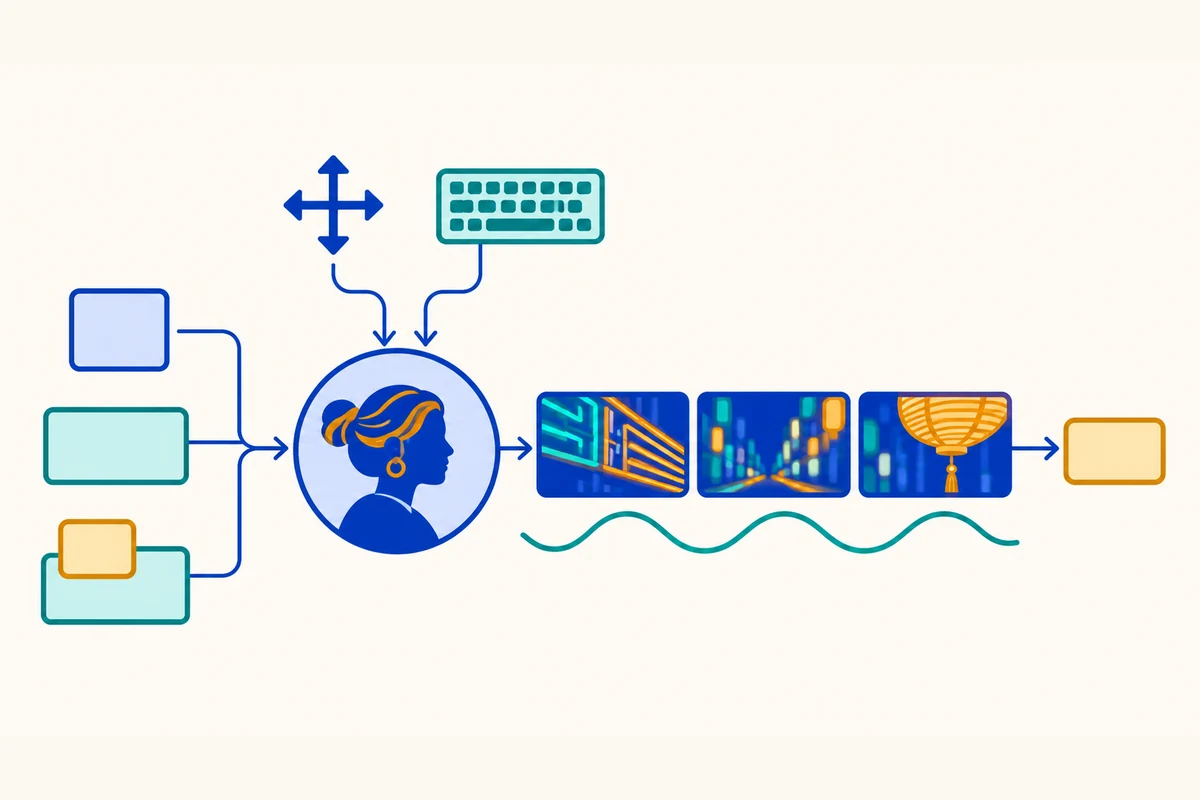
The interaction has two speeds. Google’s API documentation says native keyboard and camera actions can affect visuals in roughly 0.2 to 0.5 seconds at low round-trip network latency. Text prompts that change the environment go through world planning and may take about one to two seconds to appear. The first generated frame can take roughly five to nine seconds after setup. These timings describe Google’s documented flow and low network round-trip conditions, not a service-level guarantee for every region or application. Developers designing a responsive experience should distinguish a fast movement control from a slower instruction that asks the model to revise the scene. Google’s documented interaction timings
The API exposes two transports. WebRTC is recommended for browser applications because the browser can decode media tracks natively and use a jitter buffer. WebSocket is available for Python and Node.js scripts, frame capture and custom pipelines, with video frames and audio delivered as encoded events. Google notes that WebSocket carries more overhead and can suffer TCP head-of-line blocking when packets are lost. WebRTC data channels also impose a 64 KB control-payload limit, so the documentation recommends keeping encoded reference images under 48 KB or using WebSocket for larger images. Transport choice changes implementation complexity and latency behavior. Google’s WebRTC and WebSocket comparison
For browser use, a long-lived API key should stay on the server. Google’s example creates the interaction in a backend and mints an interaction-scoped ephemeral token for the client. The browser then connects using that short-lived token over WebRTC or WebSocket. This lets a developer keep the permanent key out of client-side code while still allowing a browser session. The interaction must be created before connecting, and a world-setup event begins generation. The API offers a concrete lifecycle for integrating a session into a product, including where authentication belongs. Google’s authentication and session quickstart
The generated audio is synchronized output. Google describes music, ambient noises and interactive dialogue as possible audio alongside the world. The current API docs specify audio in the output stream, while their limitations section says Genie 4 does not accept a live microphone or webcam stream. The input path is text, a single startup image and keyboard/camera actions. Nor does the documented session support function calling, Google Search grounding or structured outputs. A developer can add application controls around the stream, but the world-generation endpoint itself does not perform those agent functions. Genie 4 limitations in the API documentation
Billing follows generated seconds#
Genie 4 requires a paid-tier Gemini API key. Google’s API documentation says the service bills 240 video output tokens per frame, or 5,760 per second at 24 frames per second, with synchronized stereo audio included at roughly $0.10 per second. At that rate, one minute of generation is about $6 and a two-minute session about $12, before retries or other application costs. The exact bill depends on generated duration and the applicable price schedule. This pricing unit makes a live experience easy to underestimate if a product starts a session on page load or leaves generation running while a user is idle. Google’s Genie 4 billing documentation
Session cleanup is therefore part of cost control, not only connection hygiene. The API distinguishes ending an interaction from detaching a local client. Calling session.complete() tells the server to stop world generation and token billing. Detaching or closing a browser tab disconnects the transport without immediately stopping server-side generation. A service should explicitly complete sessions when users exit, when a page closes or when a maximum idle period passes. If the app leaves sessions open, its cost can continue after the user believes the experience has ended. Google’s session lifecycle documentation
The stream’s server location affects responsiveness too. Google’s documentation says Genie 4 currently serves from US data centers only and warns that round-trip latency above 150 milliseconds noticeably delays real-time keyboard steering. A browser user in Europe or Asia may experience slower controls even when the model generation itself is working as designed. Developers should test WebRTC from their target region and decide whether a North American relay is appropriate. Those checks are especially important for reflex-heavy interactions, where steering delay changes the experience. Google’s regional serving and latency guidance
An API price per second also changes how teams should compare experiments. A prototype that generates a scene for a few seconds can be cheap to iterate. A user who explores for the full session limit, restarts after a drift, or leaves multiple sessions open can create a larger bill quickly. Cost per session should include setup, retries, idle gaps and audio/video generation, not merely the time a developer actively pressed a key. Teams can set session budgets, show remaining time and close the server interaction on completion. These are product decisions prompted by a metered continuous stream.
The world is generated over a rolling horizon#
Genie 4 is a world model that generates interactive frames, rather than a persistent 3D scene graph with deterministic object state. Google describes the system as adapting frames in response to user actions and text prompts. Its own API documentation warns that landmarks, doors and buttons can shift or reset after the user looks away for eight seconds or more, turns around, or performs multiple complex edits. Visual stability may decline after 60 to 90 seconds; the hard session cap is 120 seconds. For a short prototype, that may be enough to explore an idea. For a multi-minute simulation that assumes the same object remains at the same coordinate, it is a central constraint. Google’s documented world consistency limits
The one-to-two-minute cap has implications for what a “world” means in this interface. A scene can feel continuous while the system predicts the next visual frames from a rolling temporal window. If an object leaves view and later returns changed, the experience may still look plausible moment to moment while failing a test of persistent state. An application cannot infer long-term memory from a coherent short passage. It would need to measure whether objects, paths and relationships remain stable through the exact actions users perform. Google’s model card similarly identifies object permanence, complex physical interaction, audio accuracy, readable text, spatial accuracy and long-term consistency as ongoing research areas. Genie 4 model card limitations · API limitation details
Prompt edits have different latency from movement. WASD and arrow inputs may shift the visual response in a fraction of a second at low network delay. A text request such as changing the weather passes through world planning and takes longer. That split implies a design pattern: reserve keyboard actions for continuous control and text prompts for larger semantic changes. It also means a creator cannot expect every prompt to behave like a direct, instantaneous button in a conventional game. The API exposes both controls, but they operate at different time scales. Google’s interaction timing guidance
Readable text and exact counts present their own limits. Google says signs, gauges and clocks may deform over time, and counts can drift as the camera moves. Text often appears clearly only when included in the initial world description. A spatial prototype that depends on labels, an instrument panel, a fixed number of objects or exact measurements therefore needs a verification step. Visual plausibility cannot substitute for the exact state that an application may need to track. A user may enjoy the scene even when a task requiring precise state would fail.
The service also blocks some inputs for safety. The API docs say prompts or reference images with identifiable real people, public figures or copyrighted brand intellectual property can be blocked at startup or terminate an active stream. The product announcement says generated audio and video include SynthID watermarking and that inputs and outputs pass safety screening. That affects what developers can build and how they should handle a session that ends unexpectedly. It is worth testing the moderation path with benign edge cases, not assuming every prompt that looks harmless to the application will start successfully. Google’s safety and input limitations · Google’s rollout and watermarking notice
A world model is not a full simulation stack#
Google positions interactive world generation as useful for filmmaking, spatial design, learning experiences and agent or robotics training. Those are plausible directions, but a realistic-looking scene is only one requirement for a training environment. A simulated agent must also receive actions consistently, encounter stable object state, obey useful causal rules and produce outcomes that correspond to the intended task. Genie 4’s own limitations describe ongoing work on interaction, spatial accuracy, physical causality and persistence. Those gaps matter more as the consequence of a simulated decision increases. Google on intended uses and limitations
Independent research on world-model evaluation reinforces this distinction. WMEval, a paper published before the November API release, compares interactive world models with matched action sequences in Unity-based simulations. Its nine scenes test action control, object and character consistency, mechanics, fluid behavior, causal sequences and lighting. The authors report that visual similarity can conceal deviations in physical state and cause-and-effect. The paper evaluates “Project Genie” as available at the time, so it should not be read as a benchmark score for the Genie 4 developer API released in November. Its contribution here is a testing principle: pair generated worlds with a reference system and check state, not just appearance. WMEval paper
That principle is useful before connecting a world model to a downstream agent. A developer can define a repeated action path, inspect whether camera controls work, check if an object remains where expected and record how the next state changes after an edit. For robotics research, the relevant question is whether the model preserves physical quantities and causal outcomes well enough for the intended experiment. For a creative prototype, visual responsiveness and mood may matter more than mechanical fidelity. Different uses require different acceptance criteria, and the model’s suitability should be judged against those criteria.
WMEval also illustrates why a single perceptual metric is not enough. A generated clip can look similar to a reference while its physics or object relations diverge. Conversely, a coherent simulation can look visually different yet obey a useful action sequence. The paper’s evaluation protocol uses simulator-derived states as reference, alongside perceptual measures. It does not evaluate the November API release, but it shows the kind of independent evidence needed before calling any world model a dependable simulator. WMEval methodology
The API has a narrower contract than a live agent#
Developers should distinguish Genie 4’s interaction API from other Gemini surfaces. The Genie API creates and streams a world. The documentation’s model-selection table directs real-time voice agents, microphone and camera understanding, function calling and Google Search grounding to Gemini Live instead. This helps avoid a category error: native audio generation means the world can emit synchronized sound; it does not mean the model hears a live caller or reasons over a webcam feed. A world can contain generated dialogue, while user input still arrives as text, an initial image or keyboard action. Google’s comparison of Genie, Omni and Live APIs
Likewise, a text prompt inside a world is not the same as a structured action call. Genie 4’s documented limitations include no function calling, structured outputs, live user audio/video input or session resumption across completed interactions. A developer can use its generated visual stream as one part of a larger product, but would need a separate model or deterministic application logic to query external data, transact with systems or maintain durable application state. This can be a reasonable architecture for a prototype, but the boundaries should be explicit before product expectations form.
Access control deserves attention. The API’s browser example has a backend create the interaction and mint an interaction-scoped ephemeral auth token. The persistent API key remains on the server, while the browser receives only the token for that session. A developer should follow the same pattern instead of embedding a long-lived key in client code. Session creation, token scope, completion and usage accounting become part of the application’s security design. Google’s ephemeral token guidance
AI Studio lowers the entry cost for trying the experience, with an interactive canvas and starter applications. The API makes it possible to connect the generated stream to custom interfaces and instrumentation. A team can start in the canvas to learn how prompts, movement and audio feel, then build an API experiment with a scripted action sequence. The transition between those stages should retain the same test criteria. A visually compelling Studio session is useful discovery, but a production decision needs measurements from the intended transport, network region, session duration and user flow. Google’s developer release and AI Studio canvas
What would justify a prototype#
A good first test can be deliberately short. Start from a text prompt and a reference image, then define a repeatable path with a few movement actions, one text edit and a return to an earlier view. Measure time to first frame, latency after keyboard input, delay after text edits and the cost of server generation. Check whether recognizable landmarks and objects persist across the path. Repeat at the network conditions expected for users. This separates input, steering and state questions before adding a larger application.
The test should include session cleanup from the start. Record when complete() stops server-side generation, what happens when a browser disconnects and whether a timed-out client leaves an active interaction. A page close can detach the transport without ending billing. The backend should own a session deadline and close abandoned work. Track generated seconds per user, prompt retries and incomplete sessions. These details can turn a promising prototype into a predictable product cost, or show that user behavior makes the format too expensive for the intended use.
For an interactive learning or design tool, define the value of the model in terms a user can observe. Does an edit appear quickly enough? Can a learner explore a scene without confusing state changes? Can a designer preserve the visual features that must remain fixed? If the product needs exact text, object counts or long-running continuity, test those requirements directly. The API docs already identify drift, rendering and session length as limitations, so the first prototype should verify those constraints against the task rather than infer them from example videos.
For agent or robotics training, the evaluation bar is higher. A team should compare generated trajectories with a reference simulator or controlled outcomes, test repeated action sequences and inspect failures in physics and state. It should also measure whether an agent trained in generated environments transfers to an external simulator or physical system. Google presents training agents and robotics research as future applications. Current product descriptions and an interactive API provide a way to experiment, not evidence that this transfer problem is solved. Independent evaluation remains necessary.
The API release is a developer-access change. It lowers friction for testing and building around Genie 4, and turns continuous world generation into a metered, stateful session. Developers gain multiple transports, live controls, synchronized audio and an AI Studio canvas. They also inherit a paid key requirement, server-side session management, US serving latency, a short interaction horizon and visual or physical drift. A carefully scoped prototype can answer whether the combination is useful. A broad claim about simulation, robotics or persistent interactive worlds requires evidence beyond the launch demonstration.